Disclosure: This article may contain affiliate links. If you purchase through one of these links, we may earn a commission at no additional cost to you.
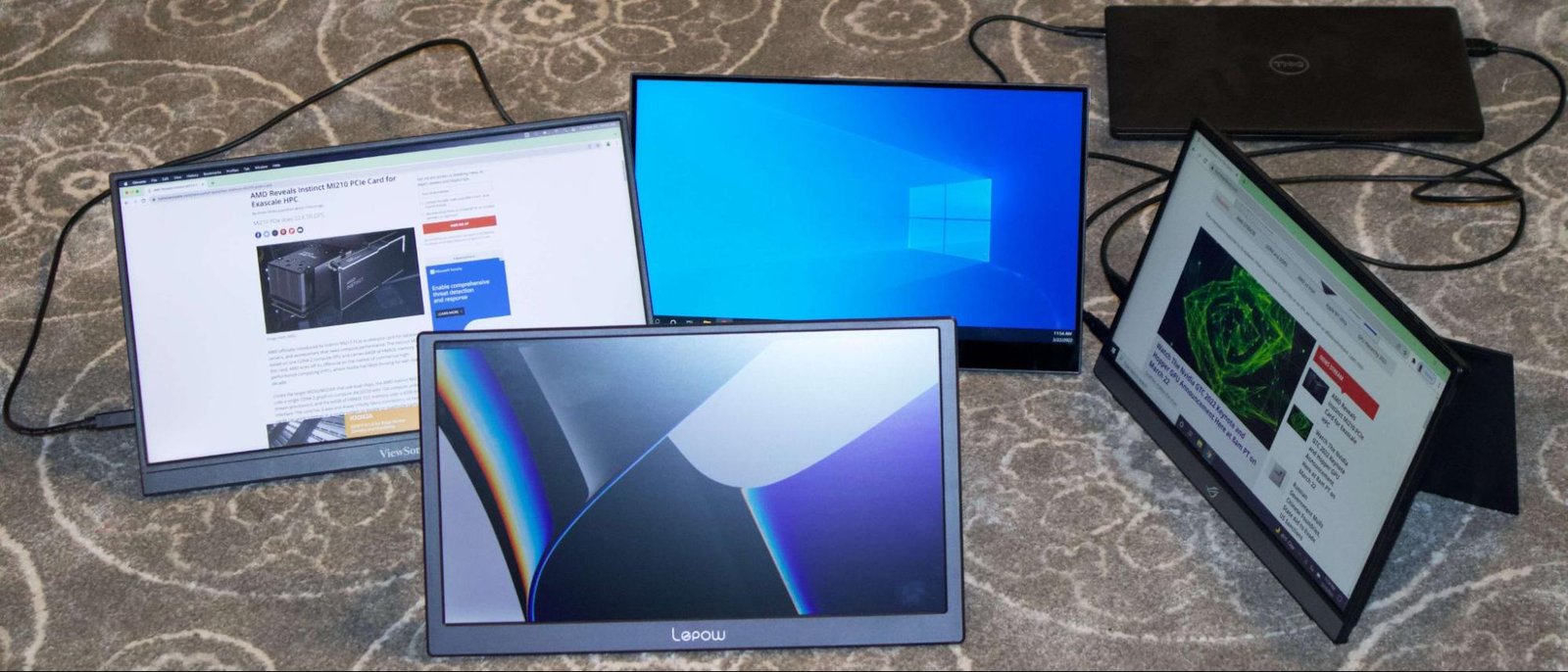
Working from a laptop is convenient until you need to compare two documents, monitor a dashboard while writing or keep a video meeting visible beside your main application. A portable monitor restores much of the flexibility of a desktop setup without requiring a permanent desk.
The best portable monitors are thin enough to travel with, bright enough for indoor work and simple enough to connect with one USB-C cable. However, specifications such as resolution and screen size tell only part of the story. Stand quality, power requirements, port selection and laptop compatibility can determine whether a monitor becomes an everyday productivity tool or an expensive object left at home.
We selected five options for different users, including business travelers, creative professionals, touchscreen users and gamers.
Best Portable Monitors at a Glance
| Portable monitor | Display | Best for |
|---|---|---|
| ASUS ZenScreen MB16QHG | 16-inch, 2560 × 1600, 120Hz | Best overall |
| Dell Pro 14 Plus P1425 | 14-inch, 1920 × 1200, 60Hz | Business travel |
| Lenovo ThinkVision M14t Gen 2 | 14-inch, 2240 × 1400, touch | Touchscreen productivity |
| ViewSonic VX1655-4K-OLED | 15.6-inch, 3840 × 2160, OLED | Creative work |
| Arzopa Z1FC | 16.1-inch, 1920 × 1080, 144Hz | Affordable gaming |
1. ASUS ZenScreen MB16QHG: Best Overall Portable Monitor
The ASUS ZenScreen MB16QHG offers an unusually strong balance of resolution, color, screen space and connectivity.
Its 16-inch IPS panel uses a productivity-friendly 16:10 aspect ratio and 2560-by-1600 resolution. Compared with a standard 1080p portable display, it provides sharper text and more vertical space for documents, websites and spreadsheets.
The 120Hz refresh rate makes scrolling and onscreen movement appear smoother. It also gives the ZenScreen enough speed for casual gaming, although running at 120Hz may draw more power from a connected laptop.
The integrated L-shaped kickstand supports landscape and portrait positioning. Two full-function USB-C ports are placed on opposite sides for easier cable management, while HDMI expands compatibility with consoles and computers that cannot output video over USB-C.
At approximately 1.2 kilograms, it is not the lightest option in this guide. Nevertheless, the additional screen space and flexible connections make it the strongest all-purpose choice.
Choose it if: You want one portable display for office work, entertainment and occasional creative tasks.
2. Dell Pro 14 Plus P1425: Best for Business Travel
The Dell Pro 14 Plus Portable Monitor P1425 is designed for professionals who prioritize portability, straightforward setup and a dependable stand.
Its 14-inch IPS display has a 1920-by-1200 resolution and 16:10 aspect ratio. The screen closely matches many current business laptops, creating a visually consistent dual-display workstation.
Two USB-C ports support DisplayPort Alternate Mode and up to 65 watts of power pass-through. With a compatible charger connected to the monitor, one cable can carry video from the laptop while returning power to it. This can reduce cable clutter in hotels and temporary offices.
The built-in stand offers a wide tilt range and supports portrait positioning. At 60Hz, the Dell is intended for office applications rather than high-frame-rate gaming.
It does not include HDMI, so laptops without USB-C video output will require a different monitor or a suitable active adapter.
Choose it if: You frequently travel with a 13- or 14-inch business laptop and want a similarly sized second display.
3. Lenovo ThinkVision M14t Gen 2: Best Touchscreen Option
The Lenovo ThinkVision M14t Gen 2 adds touchscreen input to a sharp 14-inch portable display.
Its 2240-by-1400 IPS panel produces a pixel density of approximately 189 pixels per inch, making text, diagrams and interface elements appear crisp. The 16:10 aspect ratio also provides more useful vertical workspace than a 16:9 screen.
Touch input is helpful for reviewing presentations, navigating visual applications and adding handwritten notes. It can also serve as a secondary control surface beside a conventional laptop screen. Touch and stylus functionality may vary by operating system, so buyers should confirm full compatibility with their computer before ordering.
Dual USB-C connections support power pass-through and DisplayPort video. Like the Dell, this model lacks a conventional HDMI input and works best with a modern laptop equipped with a full-featured USB-C or Thunderbolt port.
Choose it if: Touch control, handwritten annotation or interactive presentations are important to your workflow.
4. ViewSonic VX1655-4K-OLED: Best for Creative Professionals
Photographers, video editors and designers may appreciate the clarity and contrast of the ViewSonic VX1655-4K-OLED.
This 15.6-inch monitor combines 3840-by-2160 resolution with an OLED panel. Individual pixel illumination enables deep blacks and strong contrast, while ViewSonic specifies 100% DCI-P3 color-gamut coverage.
The monitor weighs approximately 1.5 pounds and includes a built-in stand that supports landscape and portrait use. Its two USB-C ports allow two-way charging with up to 60-watt power delivery, while Mini HDMI provides compatibility with cameras, consoles and computers.
Four-kilopixel resolution is extremely sharp on a 15.6-inch screen, but many users will need operating-system scaling to keep text readable. OLED panels can also experience image retention when static interface elements remain onscreen for extended periods. Using screen sleep settings and varying content can help reduce that risk.
Choose it if: Image quality, contrast and color reproduction matter more than obtaining the lowest price.
5. Arzopa Z1FC: Best Affordable Portable Gaming Monitor
The Arzopa Z1FC provides a 144Hz refresh rate at a considerably more accessible price than many premium gaming displays.
Its 16.1-inch IPS panel uses a 1920-by-1080 resolution and supports landscape or portrait positioning through the integrated stand. The higher refresh rate delivers smoother motion than a conventional 60Hz business monitor when connected to a capable gaming computer or console.
USB-C and Mini HDMI inputs provide compatibility with laptops, PlayStation, Xbox, Nintendo Switch and several handheld gaming devices. However, not every console supports 144Hz, and available refresh rates may depend on resolution, cable and source-device settings.
The Z1FC does not contain a battery. It must receive sufficient power from the connected device or a separate power adapter. This is common among affordable portable displays but important to understand before traveling.
Choose it if: You want a larger, high-refresh-rate display for gaming without paying premium monitor prices.
What to Look for in a Portable Monitor
USB-C video support
A USB-C connector does not automatically support display output. The laptop port must provide DisplayPort Alternate Mode, USB4 or Thunderbolt video. A charging-only USB-C port cannot send an image to the monitor.
Check the laptop manufacturer’s specifications for a DisplayPort symbol, Thunderbolt symbol or explicit mention of external-display support.
Power requirements
Most portable monitors do not include an internal battery. Instead, they draw electricity from the laptop or a separate USB power source. Higher brightness, resolution and refresh rates can increase power consumption and shorten laptop battery life.
Power pass-through is useful because it lets a charger power the monitor and compatible laptop through the same connection. Verify the wattage, as 60 or 65 watts may be insufficient for some mobile workstations and gaming laptops.
Screen size and weight
A 14-inch monitor fits more easily beside a compact laptop and is usually more comfortable to carry daily. A 16- or 17-inch display offers more usable workspace but takes up additional room in a bag and on small tables.
Stand design
A rigid integrated kickstand is generally more stable than a folding cover. Look for sufficient tilt adjustment and portrait support if you work with long documents, code or vertical social-media content.
Resolution
Full HD remains adequate for gaming and general productivity. A 1440p or 1600p screen offers sharper text, while 4K is most valuable for detailed images and high-resolution creative work. Higher resolution may require display scaling and additional graphics power.
Frequently Asked Questions
Can a portable monitor slow down a laptop?
Ordinary office use should have little effect on a modern laptop’s performance. Gaming, video editing and driving a high-resolution display can place additional demand on the graphics processor. Powering the monitor from the laptop will also reduce battery runtime.
Can I use a portable monitor with a phone?
Only phones that support video output can connect directly. A USB-C port on a phone may be limited to charging and data. Compatible Samsung phones, for example, may offer a desktop-style interface, while other devices may require adapters or provide no external-display support.
Can I connect two portable monitors?
Possibly, but the laptop must support the required number of external displays. Some laptop models support only one external monitor, regardless of how many USB-C ports they include.
Final Verdict
The ASUS ZenScreen MB16QHG is the best overall option because it combines a sharp 16:10 display, 120Hz refresh rate and versatile connectivity. The Dell P1425 is better for frequent business travel, while the Lenovo ThinkVision M14t Gen 2 adds useful touchscreen capabilities.
Creative professionals should consider the ViewSonic VX1655-4K-OLED, and budget-conscious gamers will find strong value in the Arzopa Z1FC. Before purchasing any model, confirm that your computer’s USB-C port supports video—the cable may fit physically even when the required display signal is unavailable.